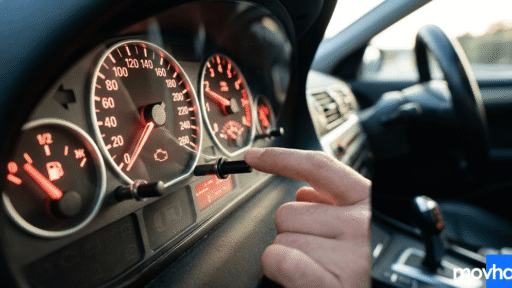



If you have recently changed your engine oil or had your vehicle serviced by an independent mechanic, you might be staring at an annoying warning message on your dashboard. Many drivers quickly find themselves searching for exactly how to reset maintenance light on toyota camry without having to drive all the way back to the dealership.
This glowing “Maintenance Required” notification is not a mechanical defect; it is simply a helpful built-in reminder system designed to keep your engine healthy. However, once the maintenance is done, clearing the notification is entirely up to you.
In this quick, easy-to-follow guide, we will walk you through exactly how to reset maintenance light on toyota camry step-by-step, covering both older generations with physical buttons and newer models with digital steering wheel controls.
Why is the Maintenance Required Light On?
Before learning how to reset maintenance light on toyota camry, it is important to know why it triggered in the first place. Your vehicle features an internal mileage counter that tracks how far you have driven since your last reset.
Typically, every 5,000 miles, the system will trigger a “Maintenance Required” message on your multi-information display. This serves as a reminder to check your fluid levels, rotate your tires, and most importantly, change your engine oil.
You should only clear this message after the necessary service has been completed. Falsely resetting the light can lead you to miss vital oil changes, which can severely damage your engine. For official maintenance schedules, always consult the Official Toyota Owners Portal.

Method 1: How to Reset Maintenance Light on Toyota Camry (Older Models)
If you drive a slightly older generation (typically 2017 or older) that uses a physical trip meter stem sticking out of the dashboard cluster, the process for how to reset maintenance light on toyota camry is very straightforward:
- Turn the Ignition On: Put the key in the ignition and turn it to the “ON” position (Position II), or press the start button twice without touching the brake pedal. Do not start the engine.
- Select Trip A: Press the trip meter reset stem repeatedly until the odometer display shows “Trip A”.
- Turn Ignition Off: Turn the vehicle completely off.
- Press, Hold, and Turn On: Press and hold down the trip meter reset stem. While holding it down, turn the ignition back to the “ON” position.
- Wait for the Reset: Continue holding the stem. You will see the mileage display flash zeros or a series of dashes disappear. Once the normal mileage returns, release the stem. The light is now reset!
Method 2: How to Reset Maintenance Light on Toyota Camry (Newer Models)
For drivers of newer generations (2018 and newer) equipped with steering wheel controls and a full multi-information display, knowing how to reset maintenance light on toyota camry requires navigating the digital menus:
- Turn on the Electronics: Press the push-button start twice without your foot on the brake pedal to power on the dashboard electronics.
- Navigate to Settings: Use the directional arrow pad on the left side of your steering wheel. Scroll left or right until you reach the “Gear” icon (Settings menu).
- Select Vehicle Settings: Scroll down to find “Vehicle Settings” and press and hold the “OK” button in the center of the arrow pad to enter the menu.
- Scheduled Maintenance: Scroll down to “Scheduled Maintenance” and press “OK”.
- Confirm the Reset: The screen will ask, “Reset Data?”. Scroll up to select “Yes” and press “OK”. A confirmation message will appear, and you are done.

Connecting Toyota Maintenance to Overall Car Health
Since you are already in a DIY mindset learning how to reset maintenance light on toyota camry, it is a great time to check other vehicles in your household.
For instance, if you or a family member owns a Toyota SUV, the process is very similar. You can easily learn how to reset maintenance light on toyota rav4 using our dedicated guide. If you own a competing sedan, checking how to reset a honda accord oil light is just as easy.
Additionally, popping the hood to change your oil is the perfect opportunity to inspect your engine. Do you know what is a serpentine belt and how to check it for cracks? A quick visual inspection takes only five seconds and can save you from a snapped belt and an expensive tow truck bill down the road.
Conclusion
As you can see, understanding how to reset maintenance light on toyota camry is a simple process that takes less than two minutes. Whether you have an older model with a physical trip button or a newer model with a digital steering wheel menu, you can easily clear your dashboard warnings from the driver’s seat.
Always ensure that you actually perform the necessary oil changes and tire rotations before resetting the system to keep your reliable sedan running smoothly for hundreds of thousands of miles.
Frequently Asked Questions (FAQs)
Does resetting the maintenance light fix my car?
No. Resetting the light only clears the digital notification on your dashboard. It does not magically change the dirty oil in your engine. You must perform the physical maintenance first to protect your vehicle.
How often does the Toyota Camry maintenance light come on?
The internal system is programmed to trigger the “Maintenance Required” message roughly every 5,000 miles to remind you to perform a routine oil change, tire rotation, and fluid inspection.
Can I figure out how to reset maintenance light on toyota camry while the engine is running?
No. For safety reasons, the reset procedure must be done while the ignition is in the “ON” position (so the dashboard is powered), but the engine itself must be completely turned off.
Is the “Maintenance Required” light the same as the “Check Engine” light?
No, they are very different. The “Maintenance Required” light is a simple mileage-based reminder for routine service. The “Check Engine” light indicates a serious mechanical or sensor malfunction that requires immediate diagnostic scanning.
What happens if I forget to reset the light after my oil change?
If you forget to reset it, the vehicle will continue to run perfectly fine, assuming the oil was actually changed. However, the light will permanently stay on your dashboard, which can be annoying and will throw off your maintenance schedule for the next 5,000 miles.